
 English
  Français
  Español
  Deutsch
  Italiano
  Português
Forum
25 posts
Posts by fontsandmore


metaphasebrothel said 
This is how I would extract the individual styles:
1) ...
I didn't test this, because I don't use Bahnschrift, but I'm confident that this method would work.
1) ...
I didn't test this, because I don't use Bahnschrift, but I'm confident that this method would work.
Bahnschrift is a variable font and all variations are stored in a single file, so this will never work.
It seems you are using older versions. FontLab moved on to version 7 which is a total rewrite of the software.
FontCreator has also been improved over the years and has an advanced OpenType Designer which allows you to add OpenType layout features to your fonts.
https://www.high-logic.com/font-editor/fontcreator
If you are on Windows and intend to make professional fonts, these font editors are your best options.
FontCreator has also been improved over the years and has an advanced OpenType Designer which allows you to add OpenType layout features to your fonts.
https://www.high-logic.com/font-editor/fontcreator
If you are on Windows and intend to make professional fonts, these font editors are your best options.
It really depends on your budget and/or if you use a Mac or Windows based system. FontCreator (Windows only), FontLab (Win & Mac), and GlyphsApp (Mac only) are all perfect for the job. You might also want to take a look at FontForge (Win & Mac).
You will just need to decide which font editor suits your needs.
You will just need to decide which font editor suits your needs.
You can make OpenType fonts that mimic single stroke with FontCreator:
https://www.high-logic.com/fontcreator/manual13/fc_single-line-fonts.html
Such fonts might look awkward when you use them outside CNC engraving software, so make a test font to see if it work for your situation.
https://www.high-logic.com/fontcreator/manual13/fc_single-line-fonts.html
Such fonts might look awkward when you use them outside CNC engraving software, so make a test font to see if it work for your situation.
Download and install MainType. Then use it to uninstall the fonts. Finally reinstall the fonts through MainType.
https://www.high-logic.com/font-manager/maintype
I am curious about your results.
https://www.high-logic.com/font-manager/maintype
I am curious about your results.
Another font generator is yourfonts.
http://www.yourfonts.com/
It produces high-quality outlines, so even at large point sizes your font will look great.
http://www.yourfonts.com/
It produces high-quality outlines, so even at large point sizes your font will look great.
1. It depends. If you have all your fonts in one location, then it is easy to add that folder to a zip file and extract it on your new computer. Otherwise an advanced font manager should do the trick.
2. MainType allows you to backup from one computer and restore to another one. It also has rating and tag support and many other advanced features, like showing OpenType features.
https://www.high-logic.com/font-manager/maintype
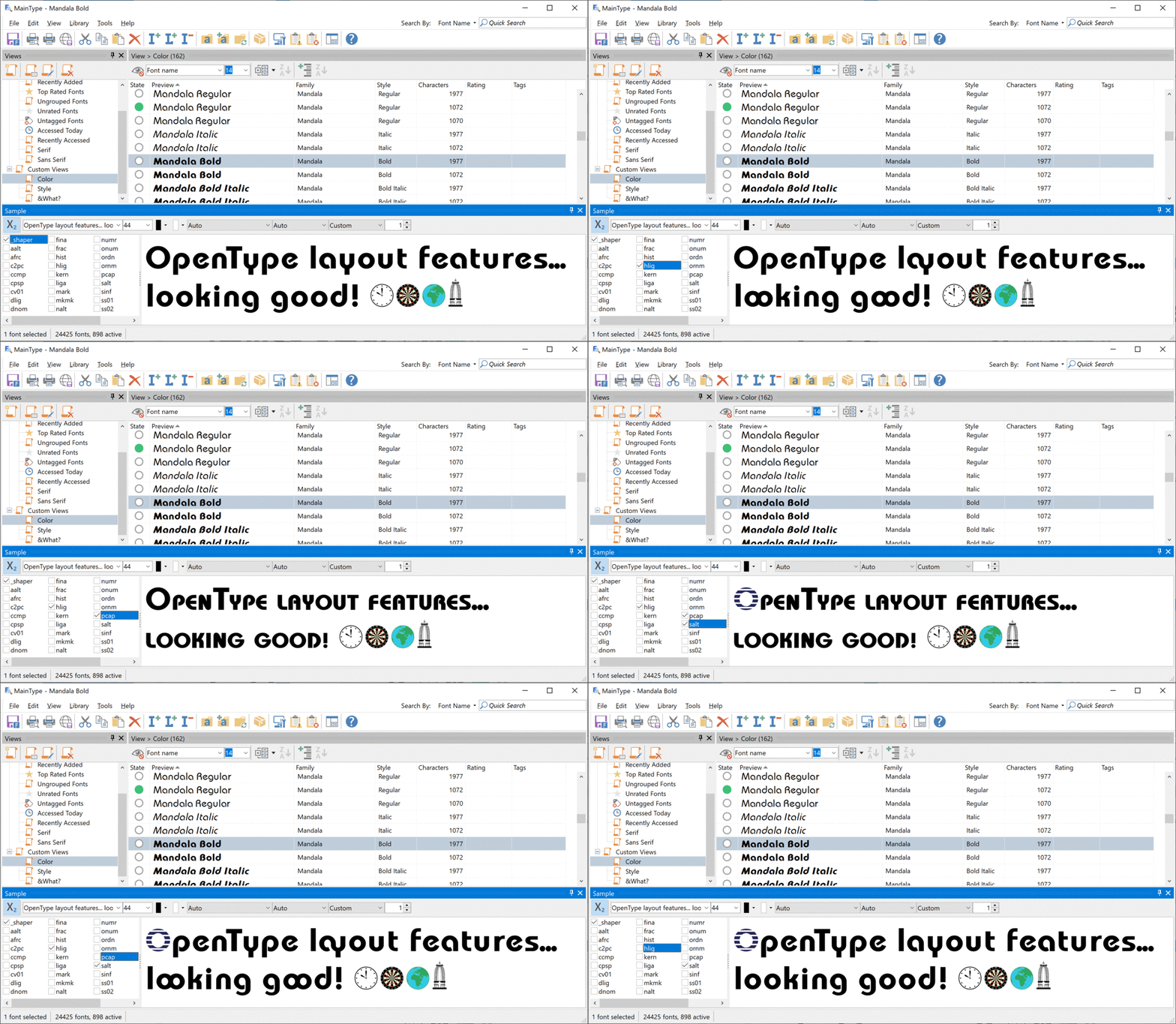
This tutorial explains how to make a backup of your fonts:
https://www.high-logic.com/font-manager/maintype/tutorials/fmsconfig
2. MainType allows you to backup from one computer and restore to another one. It also has rating and tag support and many other advanced features, like showing OpenType features.
https://www.high-logic.com/font-manager/maintype
This tutorial explains how to make a backup of your fonts:
https://www.high-logic.com/font-manager/maintype/tutorials/fmsconfig
Better use a font manager. Not sure if you have a Mac or Windows, but a good Windows font manager is MainType and it comes with a free edition.
https://www.high-logic.com/font-manager/maintype
https://www.high-logic.com/font-manager/maintype
I do not know what you mean with "my fonts", so please be more specific.
If you want a font to be available in your software, make sure you have installed it. You can either manually install a font or use a font manager.
If you want a font to be available in your software, make sure you have installed it. You can either manually install a font or use a font manager.
Depending on the software you use, if you type letters that are not part of a font, you will see those letters in a fallback font or you will see a special glyph (.notdef) that comes with the font. You can use a font manager to inspect what characters and glyphs reside in a font.

If you want to test OpenType layout features then you have to use an advanced font manager like MainType.
MainType has a free edition:
https://www.high-logic.com/font-manager/maintype
If you want to test OpenType layout features then you have to use an advanced font manager like MainType.
MainType has a free edition:
https://www.high-logic.com/font-manager/maintype
If your software supports OpenType layout features, then use the ones as available in the font.
You can use a font manager to see what features are included; see the red rectangle in the bottom right corner:

If your word processor or design software doesn't support OpenType features, you have to use the characters as defined in the private use area. You can copy and paste them into your software.
The screenshot shows MainType. That is a font manager from High-Logic (https://www.high-logic.com/). Funny enough the Pinky Cupid font has been designed with their font editor FontCreator.
Edited 2 times. Last edit on Feb 18, 2020 at 23:38 by fontsandmore
You can use a font manager to see what features are included; see the red rectangle in the bottom right corner:
If your word processor or design software doesn't support OpenType features, you have to use the characters as defined in the private use area. You can copy and paste them into your software.
The screenshot shows MainType. That is a font manager from High-Logic (https://www.high-logic.com/). Funny enough the Pinky Cupid font has been designed with their font editor FontCreator.
Edited 2 times. Last edit on Feb 18, 2020 at 23:38 by fontsandmore
I recommend to use a font manager to install your fonts. MainType has a free edition, so give it a try:
https://www.high-logic.com/font-manager/maintype
and let us know if that solved your problem.
https://www.high-logic.com/font-manager/maintype
and let us know if that solved your problem.
The main difference is between the character right after the dot.
But seriously; the file extension is not that important. The differences between OpenType fonts with TrueType and CFF based outlines is explained here:
https://forum.high-logic.com/viewtopic.php?f=5&t=1619
But seriously; the file extension is not that important. The differences between OpenType fonts with TrueType and CFF based outlines is explained here:
https://forum.high-logic.com/viewtopic.php?f=5&t=1619
In Word, go to the Font dialog. Select the Advanced tab and from there you can select a Stylistic Set. There is no option for the titling feature.
You can use a font manager to see all characters and glyphs are available. In general you need to type text, and get access to alternates through OpenType layout features. Some applications allow you to insert glyphs, but that is not interchangeable.
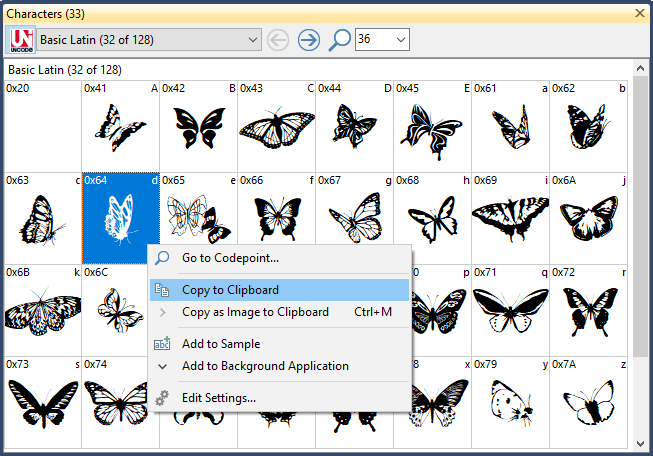
Here is how you can copy characters through MainType, a Windows based font manager:
https://www.high-logic.com/font-manager/maintype
Here is how you can copy characters through MainType, a Windows based font manager:
https://www.high-logic.com/font-manager/maintype
You can make such fonts with almost all font editors. This article, although mainly aimed at FontCreator, should get you started, even if you choose to use a different font editor:
https://www.iamcal.com/misc/fonts/pixfonttut/
https://www.iamcal.com/misc/fonts/pixfonttut/
Settings in the font file result in the specific previews. Not much you can do about it, unless you want to manually change those settings through a font editor.
As toto suggested it is best to use a font manager. A free one will do; MainType free edition for example:
https://www.high-logic.com/font-manager/maintype
As toto suggested it is best to use a font manager. A free one will do; MainType free edition for example:
https://www.high-logic.com/font-manager/maintype
FontCreator is a commercial font editor that can automatically space and kern your font in a matter of minutes. These features are available in the professional edition:
https://www.high-logic.com/font-editor/fontcreator
If you don't want to spend weeks manually adjusting spacing and kerning, then FontCreator is the way to go.
https://www.high-logic.com/font-editor/fontcreator
If you don't want to spend weeks manually adjusting spacing and kerning, then FontCreator is the way to go.
You are using an illegal copy of FontCreator.
You can buy an official license from here:
http://www.high-logic.com/shop/new-licenses.html
You can buy an official license from here:
http://www.high-logic.com/shop/new-licenses.html
Not sure what you want, but you need a font editor to make your own fonts. If you just want to download and install loads of fonts, you'll need a font manager.
There are links to several of them at the Tools section above.
There are links to several of them at the Tools section above.
All times are CEST. The time is now 22:52
